



Your corporate email with Microsoft 365

The Best Collaboration Solution

Take advantage of the Microsoft 365 cloud and take your business everywhere with the best productivity suite and office tools

Work comfortably with the capabilities of Microsoft 365 and ITD Consulting

Benefits of Microsoft 365 for your business

Collaborative

Collaborate in real-time with your team using Microsoft 365. Teams allows chat, video calls, and file sharing; Sharepoint provides collaborative space and document management; OneDrive provides secure cloud storage; and Yammer, internal communication via a corporate social network.

SECURITY

Microsoft 365 protects your information in the cloud with advanced security, including encryption of data in transit and at rest, multi-factor authentication, and threat protection with Microsoft Defender. In addition, it provides access control with IRM and complies with privacy and security regulations.

Accessibility

With Microsoft 365, access documents, email, and calendars from any device with automatic syncing that keeps everything up to date. Use apps like Word, Excel, and PowerPoint on mobile and work from Windows, macOS, iOS, or Android. You can even edit and collaborate in real time with Office Online from your browser.

Availability

With a guaranteed 99.9% uptime, Microsoft 365 ensures the constant availability of your information thanks to state-of-the-art global data centers with robust and redundant infrastructure. In addition, it offers backup, loss recovery, and 24/7 technical support.

Improve productivity across the enterprise with Microsoft 365

Streamline tasks and encourage collaboration with tools like Word, Excel, PowerPoint, and Outlook. Enjoy 50GB of corporate email, real-time chat and meetings with Microsoft Teams, and 1TB of secure OneDrive storage. With advice from ITD Consulting, maximize productivity and security in your company.

ADVANCED SECURITY AND MANAGEMENT

Microsoft 365 Defender

Protect yourself from day one with Microsoft Defender, which uses artificial intelligence to quickly detect and respond to threats such as malware, ransomware, and zero-day attacks. It provides proactive protection, detailed reports, and real-time alerts for an immediate and effective response.

Application Protection

Protect your company's data by restricting unauthorized applications and locations with Office mobile app protection. This prevents information from being compromised through insecure devices, maintaining the integrity and confidentiality of the data.

Information Rights Management

Information Rights ManagementControl access to business information with Active Directory and Azure Active Directory. Set customized permissions and specific security policies for sensitive documents, ensuring that only the right people have access to critical data.

Configured Security

Adjust security according to your teams' needs with Windows 10 and iOS and Android mobile devices. Use custom encryption policies, multi-factor authentication, and access control to protect each device and user in your technological infrastructure.

microsoft 365

Microsoft 365, customized by ITD Consulting, is the key to business productivity, offering tools such as Word, Excel, PowerPoint, OneNote, Teams, Outlook, OneDrive (1TB), Sharepoint, Planner and Forms, which facilitate collaboration, document management and communication from any device and location. These applications allow you to create, share and access files in the cloud, manage email, organize tasks and collect data, all in real time and with specialized technical support and constant updates to improve the efficiency and flexibility of your company.

Microsoft 365 Business Basic

  • 50 GB email space for corporate email
  • 1 TB cloud storage
  • Chat, call, and meet with up to 300 attendees
  • Standard security
  • 50 GB email space for corporate email

Secure cloud services: Teams, Exchange, OneDrive, and SharePoint. Only web and mobile apps: Word, Excel, PowerPoint, Outlook, Planner, Power BI, CoPilot Chat, and Power Apps.

Microsoft 365 Business Standard

Everything included in the Business Basic version, plus:

  • Desktop versions of Office apps with premium features
  • Easy webinar organization
  • Reporting tools and attendee logs
  • Manage customer appointments

Secure cloud services and desktop, web, and mobile apps: Word, Excel, PowerPoint, Outlook, Teams, Exchange, OneDrive, SharePoint, Clipchamp, Microsoft Loop, Planner, Power BI, CoPilot Chat, and Power Apps.

Comparison

Teamwork and Communication
FEATURES Microsoft 365 Business Basic Microsoft 365 Business Standard
Microsoft Teams: Online meetings and video calls with up to 300 people Incluido Incluido
Microsoft Teams: Integrates collaborative tools like apps, files, meetings, and chat Incluido Incluido
SharePoint: Create team workspaces to share information, content, and files Incluido Incluido
Audio Conferencing: Telephone access to join meetings from anywhere Add-on available Add-on available
Access attendee logs, email confirmation, and report generation to organize your webinars Not included Incluido
FEATURES Microsoft 365 Business Basic Microsoft 365 Business Standard
Word, Excel, PowerPoint, OneNote, and Outlook with web version Included Plus a web version of Outlook Included Plus a web version of Outlook
Up-to-date Word, Excel, PowerPoint, OneNote, and Outlook for iOS and Android on up to 5 mobile devices and 5 tablets for the same user Included Plus Outlook Included Plus Outlook
Real-time collaborative work with multiple users on the same document Included Incluido Included Incluido
FEATURES Microsoft 365 Business Basic Microsoft 365 Business Standard
Corporate email with 50GB capacity Included Incluido Included Incluido
Custom domain (example: yourname@yourcompany.com) Included Incluido Included Incluido
Corporate email available on mobile devices, tablets, desktop version, and Exchange Included Incluido Included Incluido
Calendar management: share availability, schedule meetings, and receive notifications Included Incluido Included Incluido
Shared calendars for scheduling meetings and responding to invitations Included Incluido Included Incluido
Accessibility to set up corporate emails for new users, restore deleted accounts, create custom scripts, etc. Included Incluido Included Incluido
FEATURESMicrosoft 365 Business BasicMicrosoft 365 Business Standard
OneDrive: 1TB of storage and file sharingIncluded IncluidoIncluded Incluido
OneDrive or SharePoint: Automatic saving and updating across all your devicesIncluded IncluidoIncluded Incluido
Guest access or link to your files for external contactsIncluded IncluidoIncluded Incluido
Permissions for accessing shared files and corporate emailIncluded IncluidoIncluded Incluido
Access files on all synced Windows, Mac, or mobile devicesIncluded IncluidoIncluded Incluido
FEATURES Microsoft 365 Business Basic Microsoft 365 Business Standard
Exchange Online Protection: Security against malware, spam, and other threats Included Incluido Included Incluido
Over 1000 security and privacy controls that comply with international, regional, and industry-specific standards Included Incluido Included Incluido
Security groups and custom permissions to control access to your information Included Incluido Included Incluido
Password policies for users to reset them within a specific period Included Incluido Included Incluido
FEATURESMicrosoft 365 Business BasicMicrosoft 365 Business Standard
Uninterrupted phone and online technical supportIncluded IncluidoIncluded Incluido
99.9% financial backup guarantee for uptimeIncluded IncluidoIncluded Incluido
Maximum number of users300300
License for commercial useIncluded IncluidoIncluded Incluido
FEATURES Microsoft 365 Business Basic Microsoft 365 Business Standard
Microsoft Forms: Collect feedback from customers and collaborators Included Incluido Included Incluido
Microsoft Teams: Manage agendas and daily tasks Included Incluido Included Incluido
Microsoft Lists: Track your team's information and work Included Incluido Included Incluido
Microsoft Bookings: Simplify scheduling and managing customer appointments Not included Included Incluido
FEATURESMicrosoft 365 Business BasicMicrosoft 365 Business Standard
Outlook, Word, Excel, PowerPoint, and OneNote: Full and updated versions for Windows and Mac;
Access and Publisher: PC version
Not includedIncluded Incluido
Linking up to 5 devices per userNot includedIncluded Incluido

Highlighted Features of Microsoft 365

Productivity Suite

Microsoft 365 offers a complete productivity suite to create, share, and access documents in the cloud from any device. With integrated apps like Word, Excel, PowerPoint, OneNote, and Teams, your team can collaborate, optimize tasks, and manage projects efficiently.

Remote Work

Facilitate remote work and online collaboration with Microsoft Teams, which allows high-quality videoconferencing, real-time chat, and secure file sharing. Your team stays connected and productive, no matter the location.

Data Security

Microsoft 365 protects your information with advanced security, including data encryption, multi-factor authentication, and threat defense. Additionally, it performs automatic backups in the cloud, ensuring the availability of your data in case of emergencies.

Access from Anywhere

With Microsoft 365, maintain your productivity from anywhere, with remote access to tools and data on all your devices. Automatic synchronization ensures information is always up to date, facilitating mobile work and labor flexibility.

Task Automation

Increase efficiency by automating repetitive tasks with Microsoft Power Automate, which allows you to create workflows to simplify processes, reduce errors, and free up your team to focus on higher-value tasks, integrating with various applications and services.

Project Management

Manage projects and teams with Microsoft Project and Planner, controlling deadlines, assignments, and resources to complete projects on time and within budget, while facilitating collaboration and tracking progress.

Automatic Updates

Microsoft 365 ensures constant access to the latest versions and automatic updates, offering new features and security improvements without interruptions or the need for manual updates.

User Management

Easily manage users, permissions, and access from the Microsoft 365 admin center, where you can create, restore accounts, and customize scripts for centralized and efficient management.

Microsoft 365 Plans

Microsoft 365 Business Basic

Microsoft 365 Business Basic offers web and mobile versions of Office apps, videoconferencing, and chat with Teams, 50 GB corporate email, and 1 TB in OneDrive, ideal for small businesses needing basic collaboration and storage tools.

Microsoft 365 Apps for Business

Microsoft 365 Apps for Business offers full access to Office apps on up to 5 devices per user, with real-time collaboration and automatic updates, ideal for businesses that need to work efficiently across multiple platforms.

FREQUENTLY ASKED QUESTIONS

What is Microsoft 365?
Microsoft 365 is a comprehensive solution that includes key applications like Word, Excel, and Teams, to facilitate collaboration and productivity from any device. It offers cloud storage, automatic updates, and advanced security for efficient and protected work.
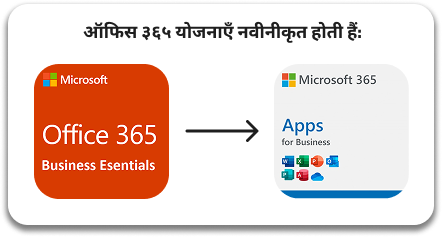
Office 365 is now Microsoft 365, maintaining the same features and prices but with a more integrated suite that includes classic applications and cloud services to improve collaboration and security. It offers access from any device and adds advanced features like artificial intelligence and data analytics, focused on productivity and business protection.
The name change from Office 365 to Microsoft 365 reflects the evolution toward a more comprehensive suite, which, in addition to classic apps, includes cloud services to enhance collaboration, productivity, and security. Microsoft 365 integrates advanced technologies like artificial intelligence and data analytics, offering a secure platform that drives digital transformation and business growth in a global environment.
The name change from Office 365 to Microsoft 365 does not affect prices or features, keeping the same conditions for users. This update is strategic to align the offering with the vision of integrated solutions in productivity and security, ensuring a smooth transition without changes in costs or functionalities.
If you have an active Office 365 for Business subscription, the change to Microsoft 365 will not affect your subscription or terms. You will continue with the same apps, services, and security; only the name in the portal and billing will change, with no modifications to prices, terms, or features.
Microsoft 365 for Business allows you to install Office on up to 5 PCs or Macs, 5 tablets, and 5 mobiles, facilitating access from multiple devices. This ensures productivity and security, with always-updated apps, ideal for teams working from anywhere.
Microsoft 365 can be paid with major credit cards, with clear charges on the statement. It offers monthly or annual billing depending on your plan, with email notifications to review and download invoices, making management easier and ensuring continuous access to services.


Microsoft offers flexible monthly subscriptions, which can be canceled anytime, and annual subscriptions, which may include discounts and monthly or annual payments. Some plans, like Microsoft 365 Enterprise, are only available annually, allowing businesses to choose the option that best fits their budget and needs.

When transitioning from the free trial to a Microsoft 365 subscription, your settings and files remain intact so you can continue without interruptions. You have 30 days after the trial ends to subscribe before your information is deleted, which cannot be recovered afterward. 

Microsoft 365 allows offline work with apps like Word, Excel, PowerPoint, and Outlook, creating and editing documents without connection. Files on OneDrive automatically sync once you reconnect. Outlook also works offline to manage emails and calendars, syncing everything once connected, ensuring productivity even without the internet. 

When you cancel Microsoft 365, you have a 90-day grace period to access with limited features and back up your data before it is permanently deleted. It is vital to take advantage of this time to secure your files and prevent irreversible loss.

If you have questions about how Microsoft 365 can benefit your business, contact us. At ITD Consulting, we offer support in Spanish for Argentina, Bolivia, Chile, Colombia, Costa Rica, Ecuador, El Salvador, Spain, Guatemala, Honduras, Mexico, Nicaragua, Panama, Paraguay, Peru, Uruguay, and Venezuela. We assist with plans, features, subscriptions, and payment methods to help you make the most of this platform.

Specifications are gathered from the manufacturer or authorized third parties to consolidate information.

CONTACT US

Send us your inquiry, and we will assist you immediately to resolve your doubts.

WRITE TO US

Write us your inquiry, and we will assist you immediately to resolve your questions.